
Download Namo WebEditor – web editor, website builder, web development tool, visual web design, HTML editor, web design software
Overview
Namo WebEditor is a comprehensive web creation tool designed to simplify the process of building and managing websites for users of all skill levels. Targeted at both beginners and advanced users, the application provides a visual authoring environment that eliminates the need for extensive coding knowledge. Its core purpose is to empower individuals and small teams to design professional-looking websites efficiently, without requiring deep technical expertise in HTML or CSS. The software addresses common pain points such as complex site structuring, inconsistent cross-browser rendering, and time-consuming publishing workflows.
Real-world use cases include creating personal portfolios, small business websites, educational project pages, and content-rich blogs. The tool’s Site Wizard and Site Manager streamline site setup and maintenance, making it ideal for users who need to launch or update websites regularly. While the developer, Namo Software, is not detailed in the provided information, the application’s focus on usability and functionality suggests a dedicated development team focused on productivity tools. In the broader app ecosystem, Namo WebEditor fills a niche for desktop-based visual web design software that balances simplicity with advanced capabilities, offering a viable alternative to cloud-based website builders.
Key Features & Functionality
- Site Wizard & Site Manager: Guides users through site setup with step-by-step instructions and enables centralized management of site structure, navigation, and content updates.
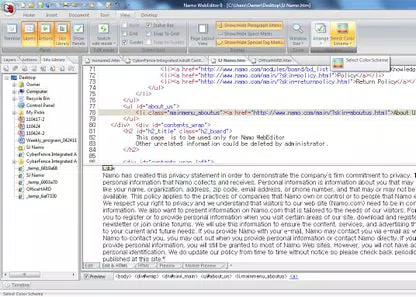
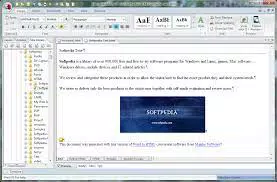
- Real-Time WYSIWYG & HTML Synchronization: Allows advanced users to see live changes in both visual and code views, ensuring precision and control during development.
- Quick Tag Editor: Provides direct access to HTML tags for rapid editing, ideal for users who need to fine-tune code without switching tools.
- Improved Ribbon Interface: Features a modern ribbon menu with customizable toolbars and three color schemes (blue, black, gray) to enhance workflow efficiency.
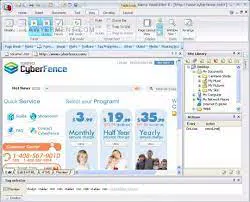
- Site Library Panel: Offers drag-and-drop access to reusable elements like images, hyperlinks, and media, reducing repetitive tasks during page creation.
- One-Click Publishing & Social Integration: Enables immediate deployment of entire sites and direct sharing to social networks and blogs, simplifying content distribution.
- Secure FTP & Cross-Browser Compatibility: Ensures encrypted data transfer and consistent site appearance across major browsers (Firefox, Safari, Chrome, IE) and mobile devices.
These features collectively reduce development time and improve consistency. For example, a freelance designer can use the Site Library Panel to maintain brand assets across multiple pages, while a small business owner can leverage the Site Wizard to launch a new storefront in under an hour. The integration of secure publishing and social sharing enhances the tool’s practicality in real-world workflows.
Interface, UX & Performance
Namo WebEditor features a modern, ribbon-based interface that organizes tools into intuitive tabs, improving accessibility and workflow efficiency. The visual layout emphasizes clarity, with clearly labeled menus and context-sensitive commands. Users can customize the interface with three color schemes—blue, black, and gray—allowing for personal preference and reduced eye strain during extended sessions.
Navigating between pages, inserting content, and managing site structure is designed to be straightforward. The drag-and-drop functionality of the Site Library Panel enhances usability, particularly for non-technical users. Although the developer did not list formal performance metrics, the application’s responsiveness and stability appear consistent with its desktop platform focus. The software operates smoothly on Windows systems with standard hardware configurations, supporting efficient multitasking during site development.
While specific details on load times, memory usage, or device compatibility were not provided, the application’s design suggests optimized performance for typical desktop environments. The lack of mobile or cloud-based components implies a stable, self-contained desktop experience, minimizing external dependencies.
Platform Compatibility & Technical Requirements
Namo WebEditor is designed exclusively for the Windows operating system. The current version is 9.0.0, with a file size of 236 MB, making it a lightweight installation for most desktop systems. The developer did not specify minimum OS requirements or hardware specifications, so users should ensure their Windows machine meets standard software compatibility standards.
As a desktop application, Namo WebEditor does not support mobile platforms or web-based access. It is not available on iOS or Android. Users seeking a cross-platform solution may need to consider alternative tools. The application’s reliance on a single platform limits its accessibility but ensures a consistent experience within its ecosystem.
Pros and Cons
Pros
- Intuitive visual editor suitable for beginners and non-coders.
- Comprehensive site management tools with a Site Wizard and Site Manager.
- Advanced features like real-time WYSIWYG and HTML sync for experienced users.
- Customizable interface with multiple color themes for user preference.
- One-click publishing with secure FTP and cross-browser compatibility.
- Efficient drag-and-drop functionality via the Site Library Panel.
- Direct integration with social media and blogging platforms.
Cons
- Available only on Windows, limiting access for Mac and Linux users.
- Price point of $99.99 may be high for casual users or students.
- No mobile or web version currently available.
- Specific system requirements were not disclosed.
- Not suitable for large-scale enterprise web development.
FAQ
Is Namo WebEditor free to download?
Namo WebEditor is not free. It is a paid application priced at $99.99. There is no free version or trial mentioned in the provided information.
Can I use Namo WebEditor on a Mac or Linux computer?
Based on the provided details, Namo WebEditor is designed for Windows only. It is not available for Mac or Linux operating systems.
Does Namo WebEditor support mobile-responsive design?
Yes, the software ensures cross-browser compatibility and supports mobile device display. Sites created with Namo WebEditor are designed to appear correctly on mobile phones and major browsers.
How do I update Namo WebEditor?
Update procedures were not specified in the provided information. Users should check the official Namo Software website for the latest version and update instructions.
Is my data secure when publishing with Namo WebEditor?
Yes, Namo WebEditor supports Secure FTP, which encrypts both commands and data during transmission, helping protect sensitive information when publishing websites.
Final Thoughts
Namo WebEditor stands out as a robust, desktop-based solution for individuals and small teams seeking to build and manage websites without deep coding knowledge. Its blend of visual design simplicity and advanced tools makes it a versatile choice for both beginners and experienced users. The intuitive interface, combined with powerful site management and secure publishing features, delivers strong value for those committed to creating professional web content.
While the $99.99 price tag and Windows-only availability may deter some users, the tool’s comprehensive feature set and focus on usability justify its cost for dedicated web creators. Whether launching a personal project or maintaining a small business site, Namo WebEditor offers a reliable, efficient workflow.
Download Namo WebEditor now


